Troubleshooting
This page collects the most common error situations and the related management procedures. The dashboard indicators described in the Monitoring and automation page highlight the documents requiring an intervention.
Errors related to missing permissions
If right after the installation of the app the users encounter errors related to missing permissions, verify that one of the predefined permission sets of the app has been assigned to the users, as described in the Getting started page.
Blocking error during posting
During the posting of the sales documents, formal checks are performed on the presence of the setup data mandatory for electronic invoicing; in case of missing data a blocking error message is returned.

Complete the configuration indicated by the message (see the Electronic Document Setup and Standard data setup pages) and repeat the posting. The checks are performed only if the document is configured to be sent as an electronic document.
Error during sending
During the sending as well, checks on the formal correctness of the data and of the configurations are performed; if the checks are not passed, during the manual sending an error message is returned and a page is opened from which it is possible to consult the sending log and correct the data:
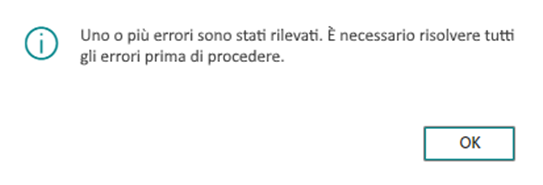
After the correction, the sending can be repeated through the Send electronic document function.
Document rejected by the SdI
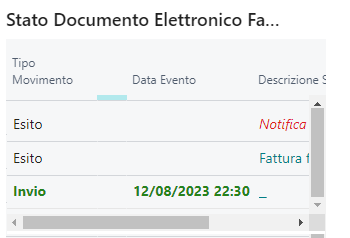
When the SdI returns a rejection notification, the document is set to Error status and becomes visible in the Sales invoices/credit memos in error cue of the dashboard.
The rejection message can be consulted directly from the single document, besides the dedicated tab, in the factbox related to the sending history:
Alternatively, it is possible to open the related staging entry:

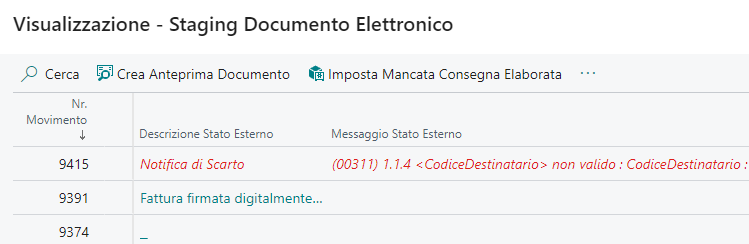
The documents in this status are not further processed by the automatic procedures: it is necessary to manually verify the cause of the rejection, correct the errors and proceed with the manual resending of the document.
The rejected document can be resent with the same invoice number: the system assigns a unique identifier to the sent file. Please note that the Sistema di Interscambio allows the resending of an invoice only in case of rejection (outcome NS) or refusal by the recipient when applicable (outcome NE with reason EC02); in the other cases the resent invoice would be rejected as a "Duplicated invoice".
Among the most common rejection causes is the missing VAT transaction nature on the combinations with 0% VAT (see the Standard data setup page).
Failed delivery to the customer
The failed delivery notification indicates that the SdI correctly took charge of the document, but could not deliver it to the recipient (for example because of an unreachable recipient code). The document is in any case correctly processed on the SdI and is made available to the recipient in its reserved area of the Italian Revenue Agency portal.
The documents in this status are highlighted in the Failed Delivery Notification cue of the dashboard. In these cases it is advisable to notify the customer through alternative channels (for example by email); in the Electronic Document Staging page it is possible to mark the documents already handled through the Set Processed Missing Notification action, to keep track of the documents for which the customer still needs to be notified.
Posting number sending in error
The sending calls of the posting number to the preservation system that were not successful are highlighted in the Posting No. Sending in Error cue of the dashboard. The documents in this status must be verified and the sending of the posting number must be repeated manually through the dedicated functionality, as described in the Purchases page.
Support
If the encountered problem does not fall within the described cases, or the error persists, please write to support@mementoas.com indicating the company, the document number and, if available, the error message returned by the system or by the portal.