Self invoices and reverse charge
Starting from July 1st 2022, the data related to purchase operations for goods and services received from non resident counterparties, both EU and non EU, must be transmitted electronically through the SdI by the 15th of the month following the receipt of the paper documents proving the operation or the execution of the operations. The same process also includes the internal reverse charge cases (for example the construction sector).
The sending process of the purchase documents is analogous to the one described for the sales flow; however, the additional configurations described below are necessary.
Configuration
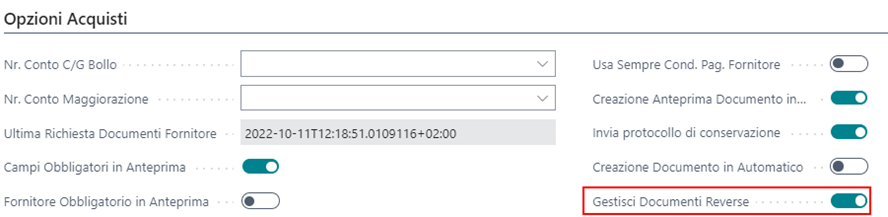
Enable the Manage Reverse Documents field in the Electronic Document Setup page, Purchases Options tab:
Specify the unique code of the company in the Fattura Setup page, used for the export of the reverse charge documents:

Assign the document type (for example TD16, TD17) to the desired combinations in the VAT Posting Setup, to automate the assignment of the document type during the release. The configuration must be performed only on the combinations related to purchases and not on sales:
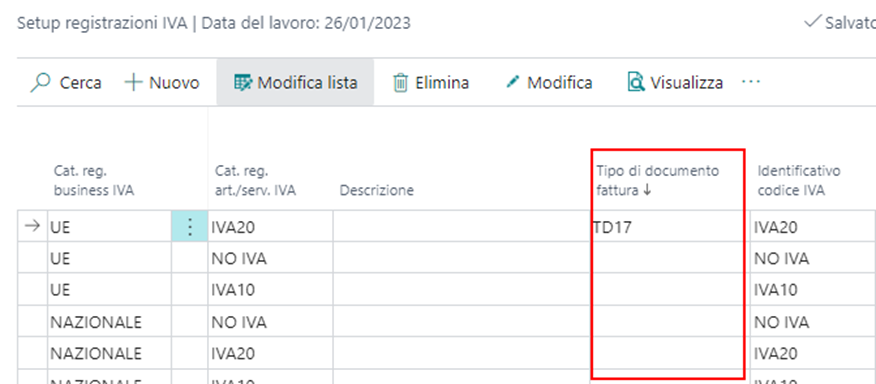
The same type of configuration can alternatively be performed at VAT register level.
It is also possible to select the value manually, directly in the invoice header, in the Electronic Document tab; this value has priority over those configured in the VAT posting groups of the lines:

In the header of the draft invoices and credit memos the Receipt Date El. Document field is available, where the system inserts by default the receipt date of the electronic document, if the document was received from the SdI. The date can be entered or modified manually and is reported in the XML of the electronic document, if the Receipt Date in Reverse Charge field is enabled in the setup:

Note: if the receipt date is not populated, for example because it is a foreign invoice, the posting date chosen for the document is reported in the XML file.
In the Electronic Document Setup the ID SDI in Self Invoice field is also available: for internal self invoices for which a purchase invoice has been received from the SdI, it inserts the SDI code of the document in the dedicated tag of the FattureCollegate section (otherwise the invoice number is reported).
Parameters determining the sending
The document must have executed reverse charge: the VAT calculation type configured in the VAT Posting Setup page, at the intersection between the VAT business posting group of the vendor and the VAT code used in the invoice line, must be Reverse Charge VAT:

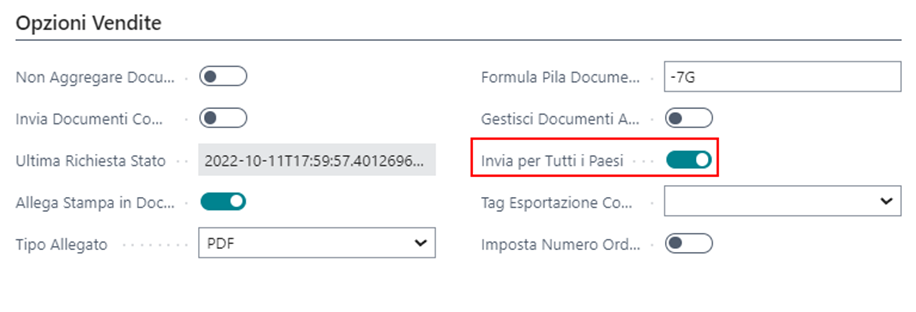
The country of the document must have the sending flag or, alternatively, the sending for all countries must be enabled in the Electronic Document Setup:
When the document falls within the cases subject to sending, additional checks are performed during posting:
The Electronic Document Type field must be populated. It can be populated automatically during the release of the document, by specifying the default value at VAT posting setup or VAT register level.
The vendor master data necessary for the sending must be populated.
Sending the document
Mirroring the sales documents, the purchase documents subject to reverse charge are automatically sent to the SdI by the job queues; they can be sent manually if needed.
Print and export of the document
Also for the purchase documents posted with reverse charge, using the Export electronic document and Print electronic document actions it is possible to:

Export the electronic document in XML format.
Print the electronic document applying the dedicated stylesheet.
Note: if the document has already been sent successfully (electronic document status Sent or Closed), the document actually sent to the SdI is exported; otherwise (status Open or Error) the file is generated on the fly.
Preventing the creation of the document preview
In case of self invoices and reverse charge, the SdI sends again as a purchase document the previously sent document; it is therefore recommended to prevent the creation of the electronic document preview, to avoid these documents being available for an additional posting on the purchase side.
To prevent the creation of the preview it is possible to enable the Check Reverse field for the related document type (typically TD16, TD17, TD18, TD19):
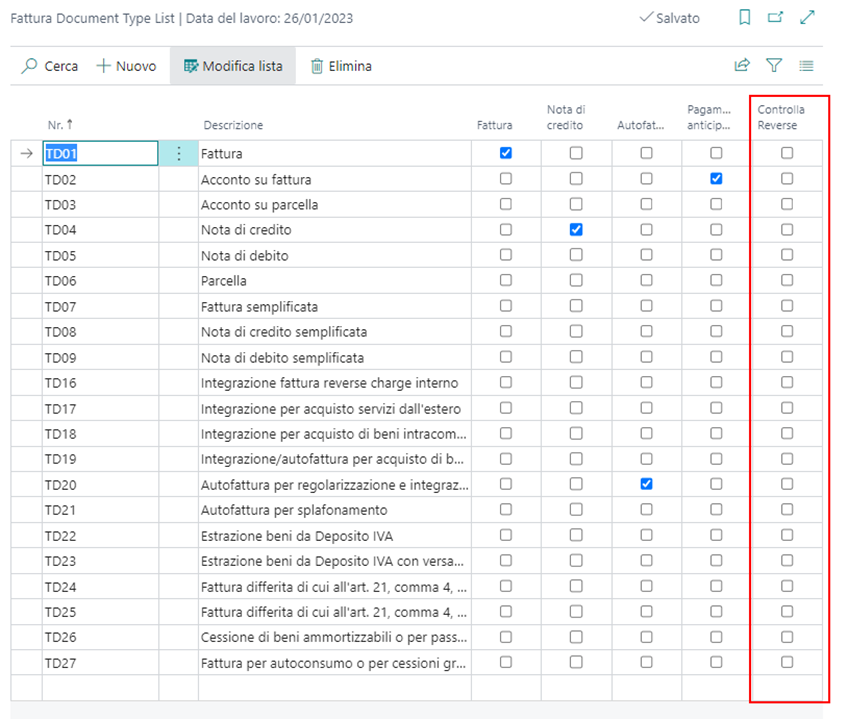
This way, during the retrieval of the purchase documents, those having the document type with the Check Reverse flag are marked in the Electronic Document Staging page with the Reverse Charge status and the document preview is not created.