Monitoring and automation
Dashboard
In the accounting role center it is possible to access cues containing the indicators of the sending and receiving status of the electronic documents.
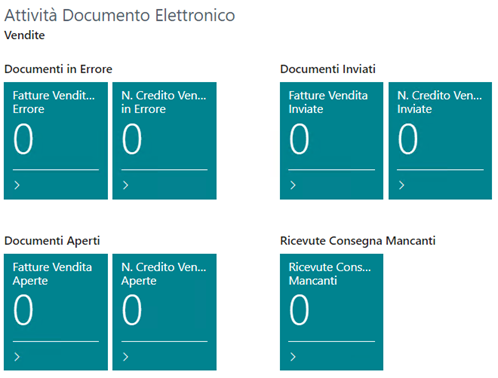
In particular, the following indicators are available:
Sales invoices/credit memos in error: the documents that could not be sent due to an error during the file generation or sending. The documents in this section must be verified and manually resent.
Open sales invoices/credit memos: the documents not yet sent, manually or through the scheduled procedures.
Sent sales invoices/credit memos: the documents successfully sent within the time range configured in the Document Sent Cue Formula setup field.
Failed Delivery Notification: the documents correctly taken in charge by the SdI but that could not be delivered to the customer.
Posting No. Sending in Error: the sending calls of the posting number to the preservation system that were not successful. The documents in this status must be verified and manually resent.
Open purchase document previews: the electronic document previews for which a purchase document has not been created yet.
Missing purchase document previews: the electronic document previews still to be created from what has been received.
Created purchase documents: the electronic document previews correctly processed, with the creation of the corresponding purchase document.
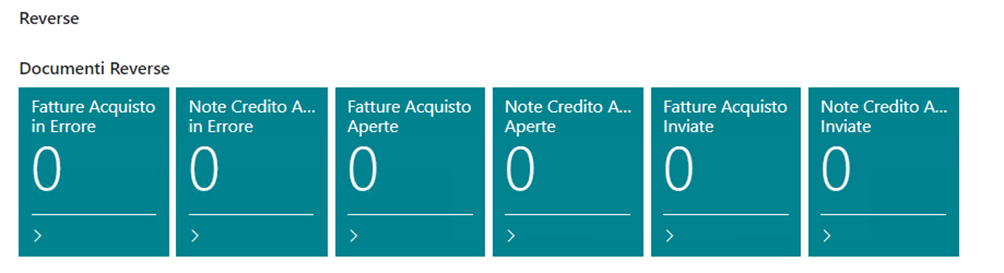
Cues analogous to those of the sales side are also available for the reverse charge sending process.
In the accounting role center the quick access to the electronic document preview is also available through the dedicated action:

The standard configuration of the cues can be created through the Cues Configuration function of the assisted setup.
Interface and communication staging
The communications with the external preservation and document exchange system are recorded in the pages named:
Electronic Document Interface
Electronic Document Staging
The Electronic Document Interface represents a single communication performed with the external system: it can be a call for the sending of one or more documents, the reception of the outcome of one or more sendings, or the reception of one or more purchase invoices.
Each interface contains in turn one or more Electronic Document Staging entries, representing the single entity (the single received purchase invoice, the single issued sales invoice, etc.):
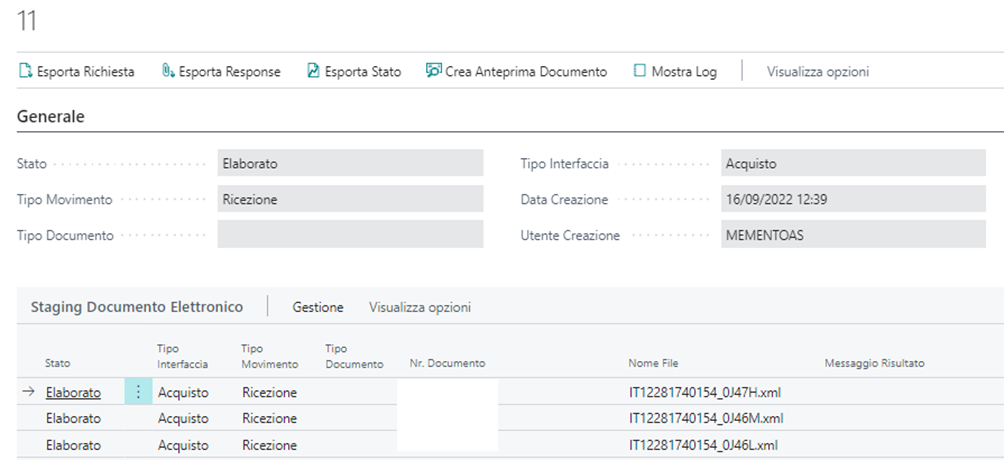
From these pages it is possible to use the following main functions:
Export the XML file generated or received for the single staging entries.
View a log of the performed activities.
Print the sent or received documents by applying the related stylesheet to the XML file.
Navigate to the various parts of the system linked to the single entity.
Job queues
The sending, receiving and status update activities can be automated through the dedicated job queues. The entries are created through the Job Queues Configuration function of the assisted setup, in "On Hold" status: they must then be activated and scheduled manually according to the specific needs.
The main automatic procedures are the following:
GETDOC: reads the issued invoices and credit memos and, for all the sendable documents, prepares the interface and staging entries generating the related XML files.
SENDDOC: sends the entries related to the previously prepared documents.
GETSTATUS: retrieves the report containing the list of the outcomes coming from the SdI.
In addition, the procedures dedicated to the purchase flow manage the periodic download of the vendor documents and the sending of the posting number to the preservation system.
It is recommended to activate the job queues only after having validated the configurations through some manual sendings, as described in the Sales page.
Rejection notifications by email
It is possible to activate a daily email notification related to the rejected documents or documents with errors, directly from the YouDOX portal. The configuration is described in the Getting started page.