Transaction codes
Bank transactions are received in the format returned by the bank, normalized according to the Berlin Group standard. Each bank fills the fields in its own way, so a configuration is needed to recognize the transactions and automate their application.
The transaction codes add the following logic on top of the standard reconciliation of Business Central:
- Automatic application of specific G/L accounts, for example for bank fees or interests.
- Extraction of the transaction text used for matching with the posted documents.
- Matching restricted to customer, vendor, employee or bank entries, depending on the type of transaction.
- Matching of vendors by the SEPA creditor identifier sent by the bank, against the Creditor No. or the VAT registration number of the vendor card.
- Default dimensions and description of the journal lines.
The configuration is reached from the Banking Central Setup page or from the payment reconciliation journal.
How a transaction gets its code
At import, every transaction receives a Transaction Code in this order:
- From a text mapping, when the transaction text contains one of the configured texts.
- From the codes sent by the bank, when present (purpose code, bank transaction code, proprietary code).
The code is then looked up in the Transaction Reason Codes. The journal shows in Recognition Source where the code of each line came from, and in Recognition Rule the mapping text or the bank field the code was read from (purpose code, bank transaction code or proprietary code):
- Text Rule: from a text mapping.
- Code Rule: from a bank code that exists in the transaction reason codes.
- Unmapped Bank Code: from a bank code that is not in the transaction reason codes yet.
- Manual: entered by hand or assigned with Assign Reason Code. It is kept by Reapply Mapping.
- None: no code recognized.
Transaction reason codes
The Transaction Reason Code page lists the codes and their rules:
- Account Type and Account No.: the fixed account to post the transactions of this code to, for example bank fees. The lines are applied with High confidence.
- Reconciliation Account Type: if set, the matching considers only the entries of the selected type, reducing errors and improving performance.
- Mapping Rule: the rule that extracts the transaction text used for matching from the data of the bank.
- Tran. Code in Text: adds the code at the beginning of the transaction text.
- Description Template: the description of the journal lines with this code, see below.
- Dimensions: default dimensions added to the journal lines with this code.
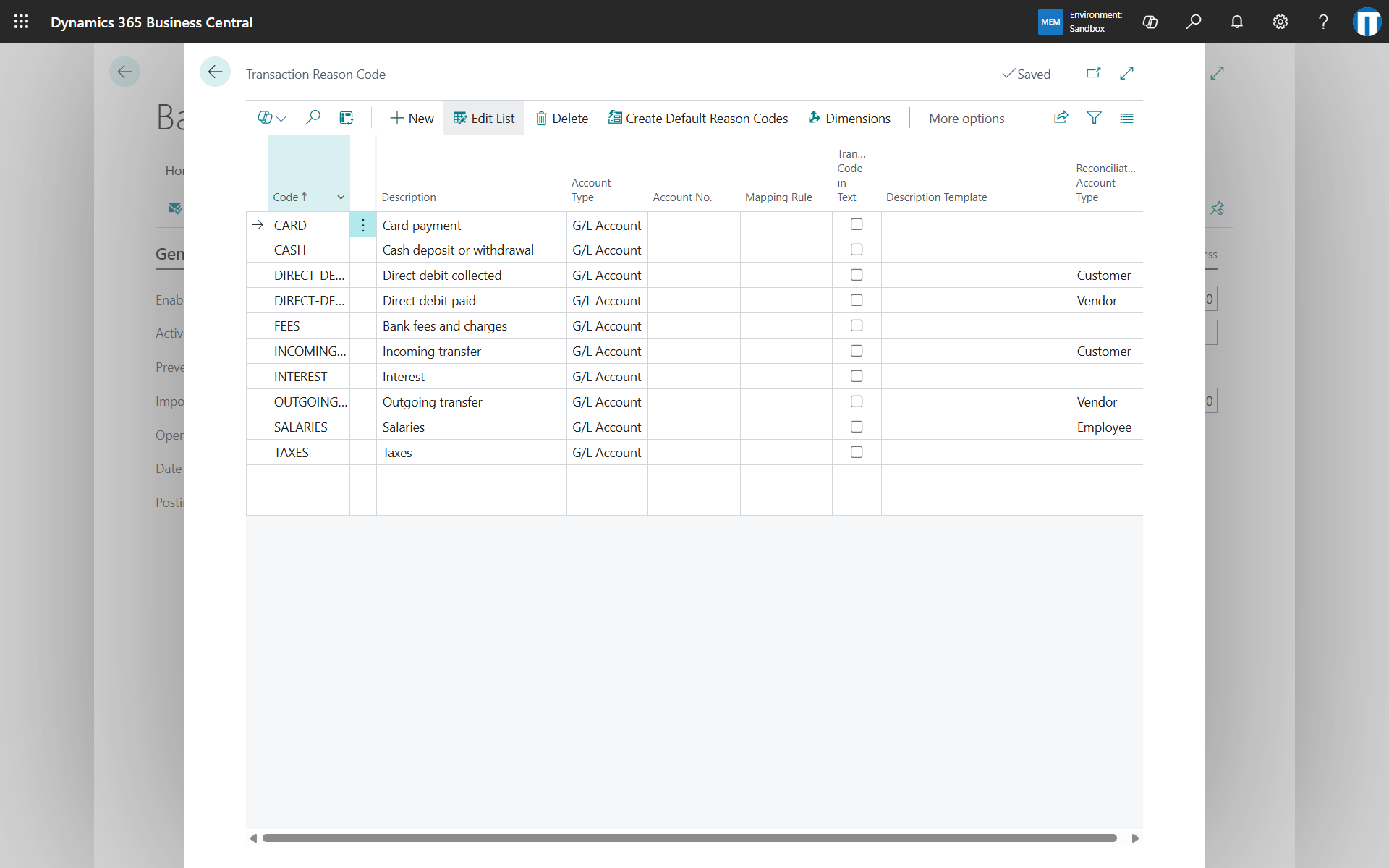
Create Default Reason Codes fills the list with a predefined set: a generic list (incoming transfer, outgoing transfer, direct debit, card, fees, interests, taxes, salaries, cash), or the codes of the ISO 20022, CBI or ZKA standards for banks that send them. The account numbers must then be completed for the codes in use.
Different rules for the same code can be set per bank account on the Bank Trans. Reason Code page. A bank-specific code replaces the generic one entirely, dimensions included.
Transaction code mapping rules
The Transaction Code Mapping Rules page defines how to read the data returned by the bank. The rule to use is set on the bank account link.
- Source Record Type: the field of the bank data to read from.
- Source Line No.: the line to read, when the field is a list.
- Start Position, Length, Start Delimiter: the position, the length or the text that identifies the beginning of the transaction text.
- Rel. Party Name and Payment Reference delimiters: the texts that surround the counterparty name and the payment reference, for banks that send them only inside the description.
For example, a bank that returns the description ACCR. BEU COD. DISP.: 0124090925307239 CASH 15 Fattura 24FV00078 Bonifico a Vostro favore disposto da: MITT.: Cliente SPA BENEF.: MEMENTO SRL in the field remittanceInformationUnstructured can be read with a rule on that field, mapping the text ACCR. BEU to the code of the incoming transfers, and a reason code rule that reads the transaction text from the first :.
Map text to reason code
The Map Text to Reason Code page lists the texts that identify a code:
- Mapping Text: the text searched in the transaction text.
- Direction: applies the text only to incoming or outgoing transactions.
- Bank Account No.: limits the text to one bank account.
When several texts match, the text of the bank account prevails over the generic ones, then the one with a direction, then the longest.
Discovery
The Statement Discovery page, reachable from the setup, groups the imported transactions of a bank account by bank code, counterparty or leading text, with the number of lines, a sample and whether a rule already covers the group.
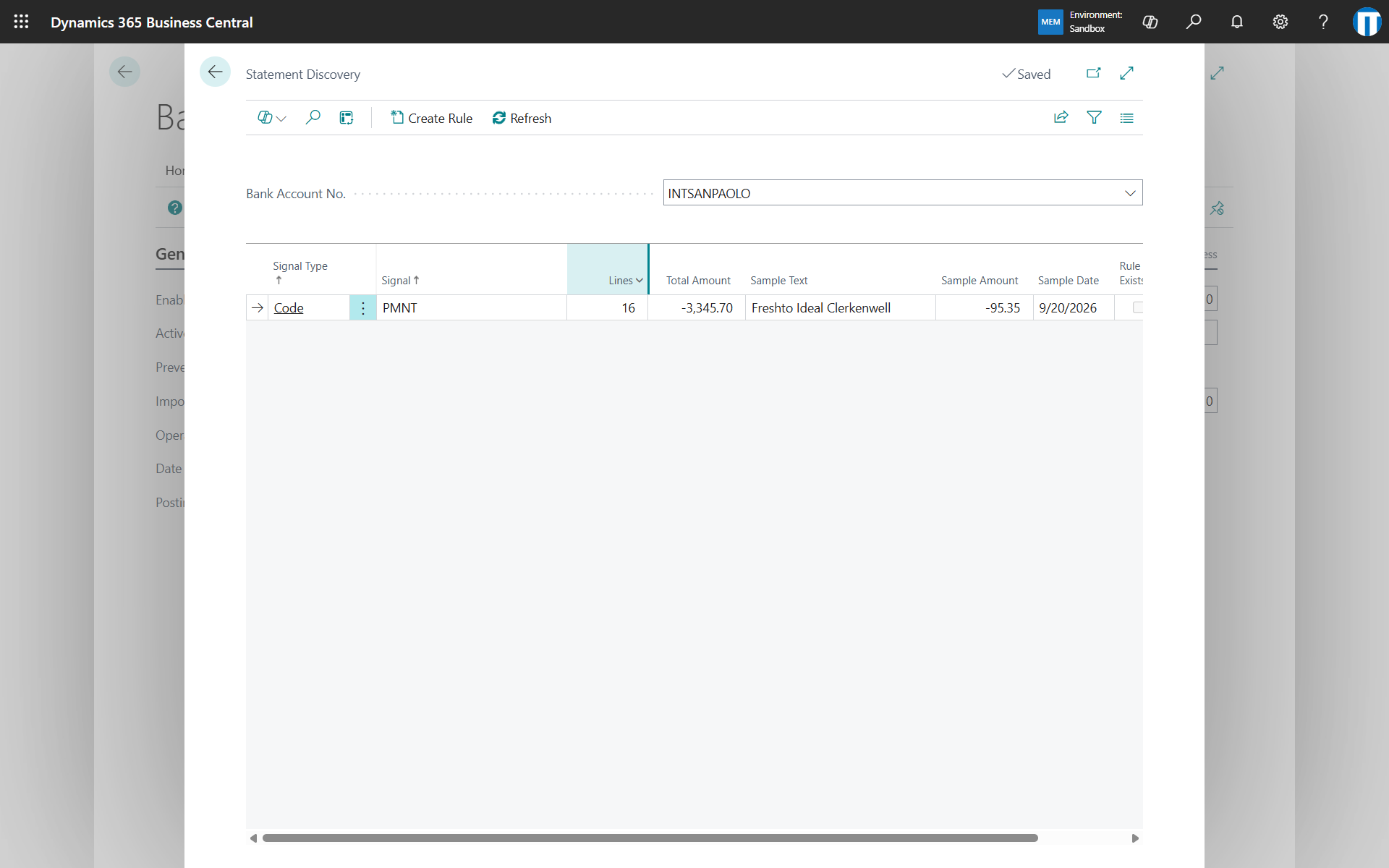
Create Rule creates the reason code for a bank code group or the text mapping for a text group. After an import, a notification on the journal reports the lines without reason code and opens the discovery.
Journal actions
The payment reconciliation journal has a Banking Central group with:
- Reapply Mapping: rebuilds the selected lines from the data received from the bank with the current transaction codes and rules, without downloading again. It only updates the codes, the descriptions and the transaction text; it does not apply the lines. Choose Apply Automatically afterwards to apply them with the new codes. Codes assigned manually are kept.
- Assign Reason Code: assigns a reason code to the selected lines and applies them to its account immediately, without Apply Automatically. Lines already applied are left alone unless Replace Existing Applications is selected. Filling Mapping Text, proposed from the transaction text of the first line, also creates the text mapping for the bank account.
Description template
The description of the journal lines is composed from a template with placeholders, set in the setup as default and on the reason codes as override. The available placeholders are:
{Related Party Name}, {Related Party Bank Acc. No.}, {Remittance}, {Additional Info}, {Transaction Text}, {Transaction Code}, {Reason Code Description}, {Payment Reference}, {Transaction ID}, {Booking Date}, {Value Date}, {Amount}, {Bank Account No.}
For example: {Related Party Name} {Payment Reference}. If the template is empty, or all its placeholders are empty for a line, the description of the bank is kept.
Activity log
The activity log keeps the history of the operations with the banks and the content received. It is enabled in the setup with Enable Activity Log and opened with Activity Log.
Download Content saves the data returned by the bank in JSON format, useful to verify where the information is and configure the mapping rules. Entries can be deleted with the actions of the page or with the standard retention policies.